MMM106

Educational Website

Home

join us

News

Vlogs

MMM team

second web

1.


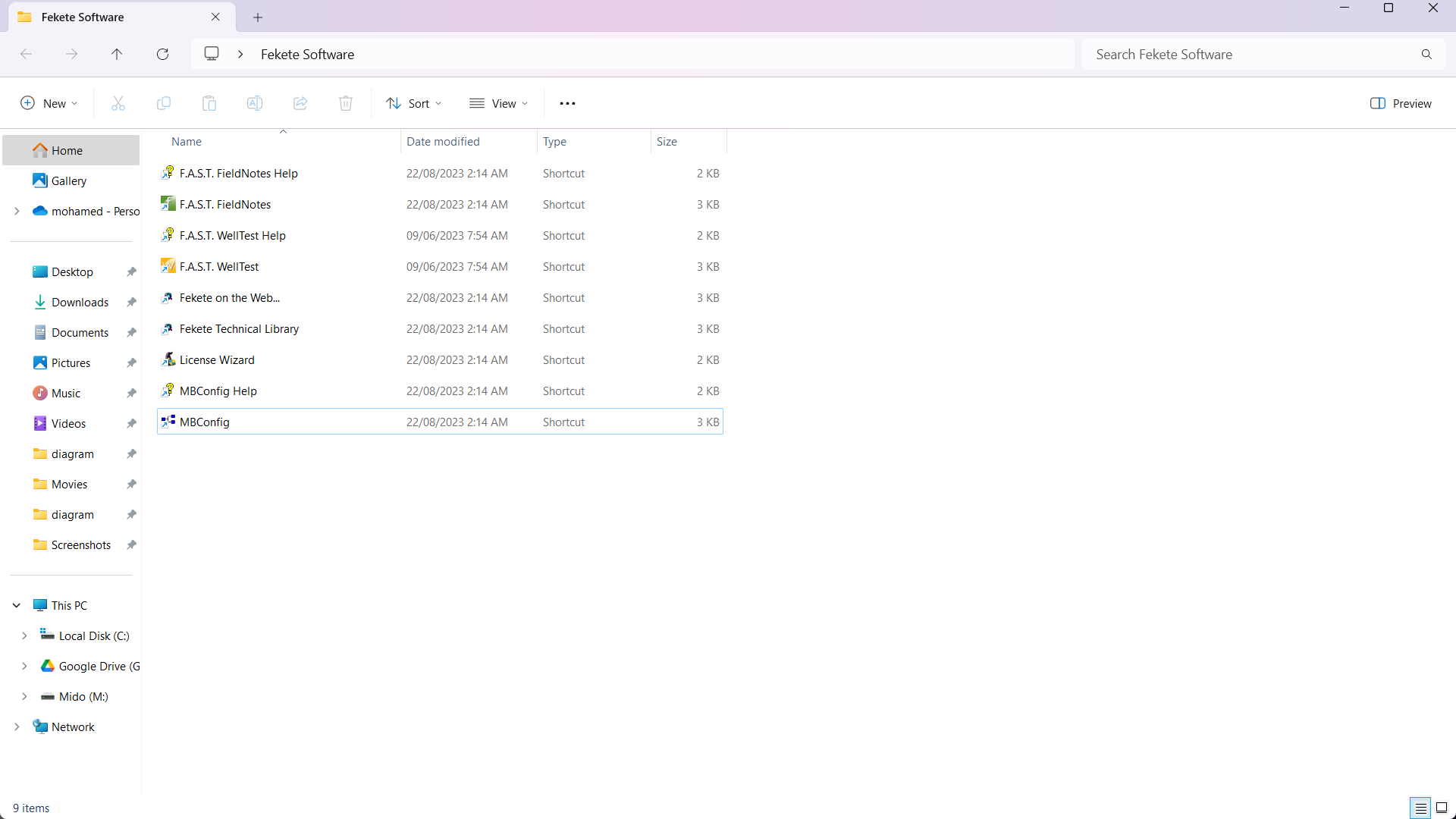
2. modbus Setup

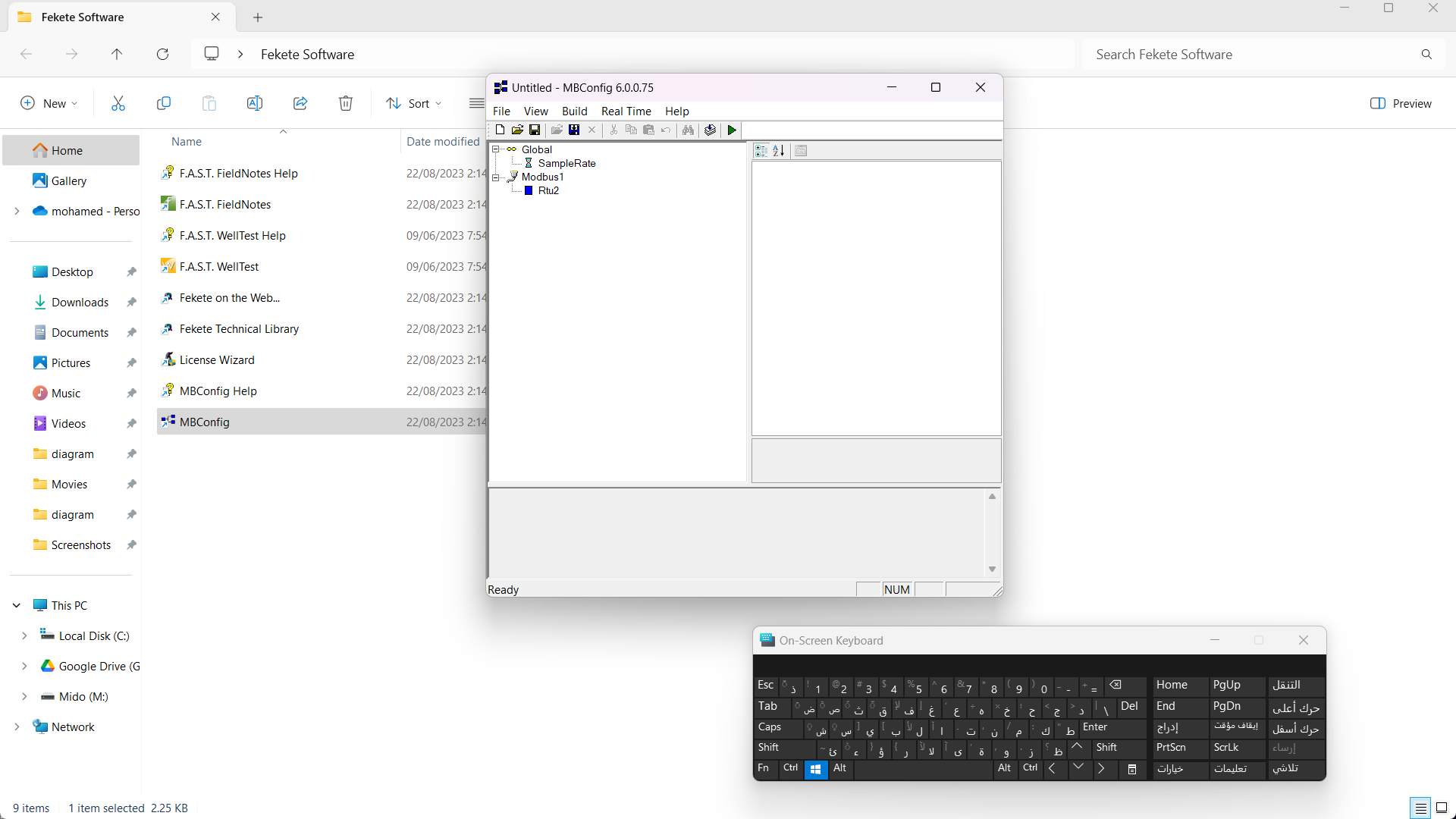
Open MBConfig to launch modbus

Modbus Screen to start adding sensors to it

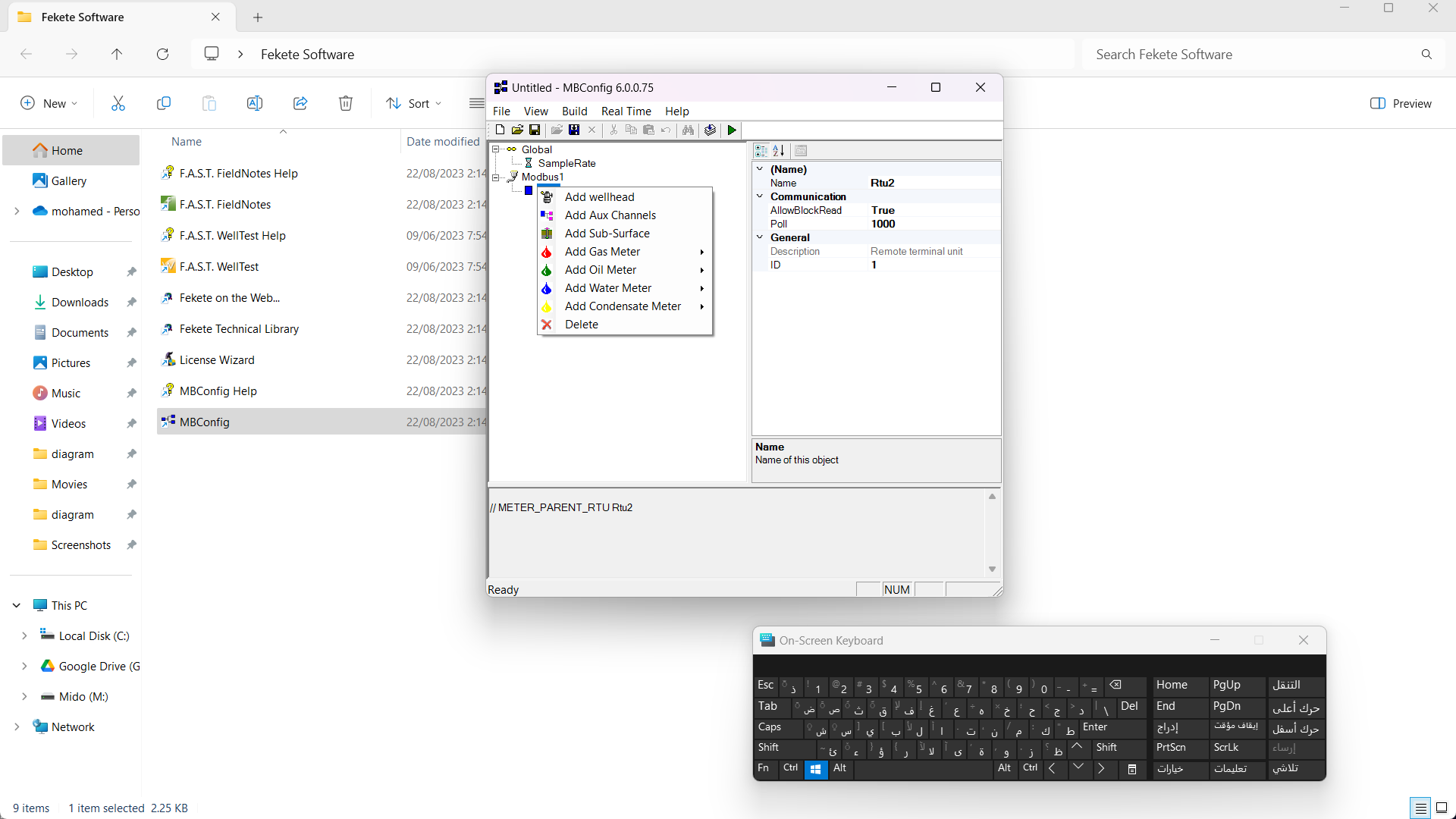
right click to add fields of sensors

Add the following fileds with sensors

  • add wellhead
    1. CasePressure (keep)
      • Name: WHP
      • Type: psi
    2. CaseTemperature (keep)
      • Name: WHT
      • Type: DegC
    3. TubePressure (keep)
      • Name: Ann
      • Type: psi
    4. TubeTemperature (Delete)
    5. DownstreamPressure (keep)
      • Name: DSP
      • Type: psi
    6. DownstreamTemperature (Delete)
  • add gas meter = gas orifice meter
    1. Diff (keep)
      • Name: Diff_P
      • Type: psi
    2. MeterStatic (keep)
      • Name: SEP_P
      • Type: psi
    3. MeterTemperature (keep)
      • Name: SEP_T
      • Type: degC
  • add oil meter = measured rate meter (for 2inch)
    1. MeterOilApiDensity (Delete)
    2. MeterTemperatureApi (Delete)
    3. MeterStaticSeparator (keep)
      • Name: Oil2Inch_P
      • Type: psi
    4. MeterTemperature_Separator (keep)
      • Name: Oil2Inch_T
      • Type: DegC
    5. MeterTemperature_Stocktank (Delete)
    6. MeterStatic (Delete)
    7. MeterMeasuredLIquidRate (keep)
      • Name: Oil2Inch_R
      • Type: bbl/d
    8. MeterTemperature (Delete)
  • add oil meter = measured rate meter (for 1inch)
    1. MeterOilApiDensity (Delete)
    2. MeterTemperatureApi (Delete)
    3. MeterStaticSeparator (keep)
      • Name: Oil1Inch_P
      • Type: psi
    4. MeterTemperature_Separator (keep)
      • Name: Oil1Inch_T
      • Type: DegC
    5. MeterTemperature_Stocktank (Delete)
    6. MeterStatic (Delete)
    7. MeterMeasuredLIquidRate (keep)
      • Name: Oil1Inch_R
      • Type: bbl/d
    8. MeterTemperature (Delete)
  • add water meter = produce volume meter
    1. MeterStatic (Delete)
    2. MeterTemperature (Delete)
    3. MeterLiquidVolume (Keep)
      • Name: MeterLiquidVolume
      • Type: bbls
  • add water meter = measure rate meter
    1. MeterStatic (Delete)
    2. MeterMeasuredLiquidRate (Keep)
      • Name: Water_Meter
      • Type: bbl/d
    3. MeterTemperature (Delete)
  • add Aux channel (add Aux channel = pressure channel)
    1. AuxStatic
      • Name: ReInj_P
      • Type: psi

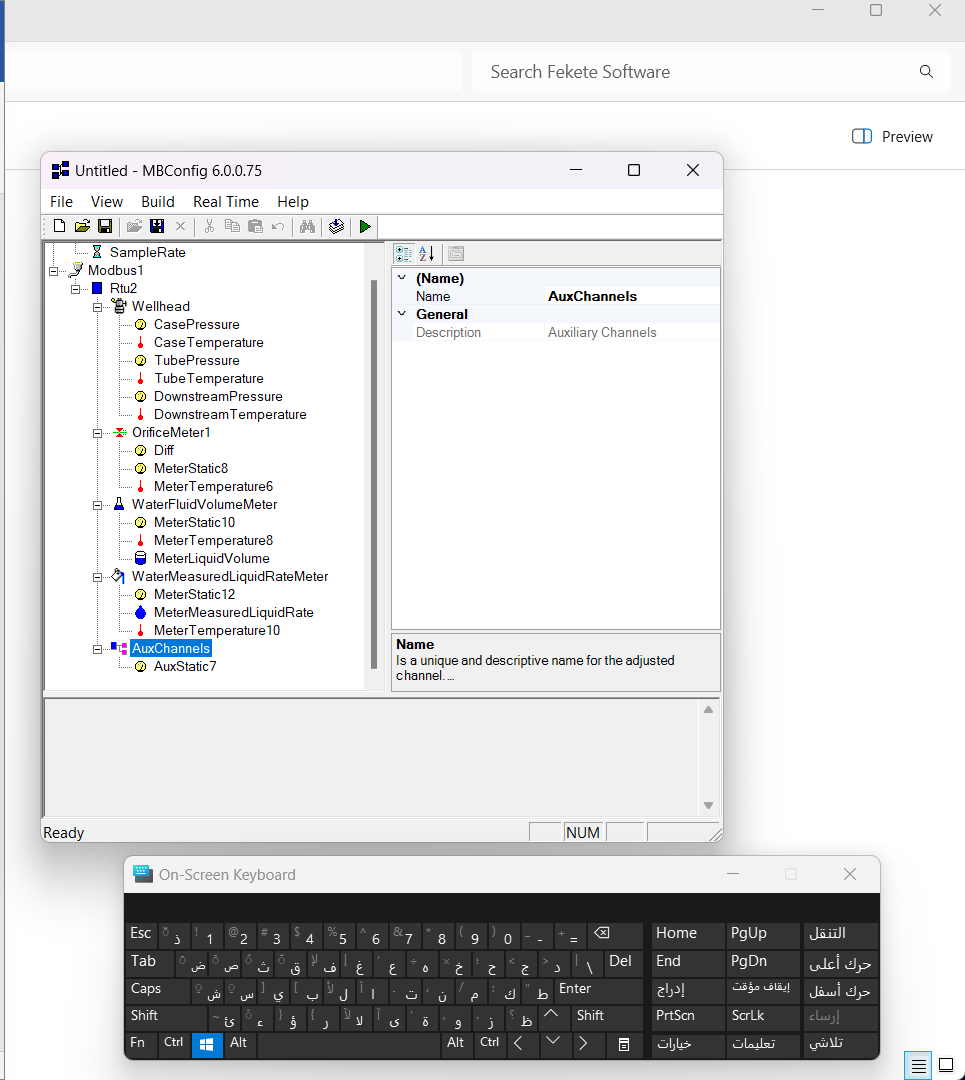
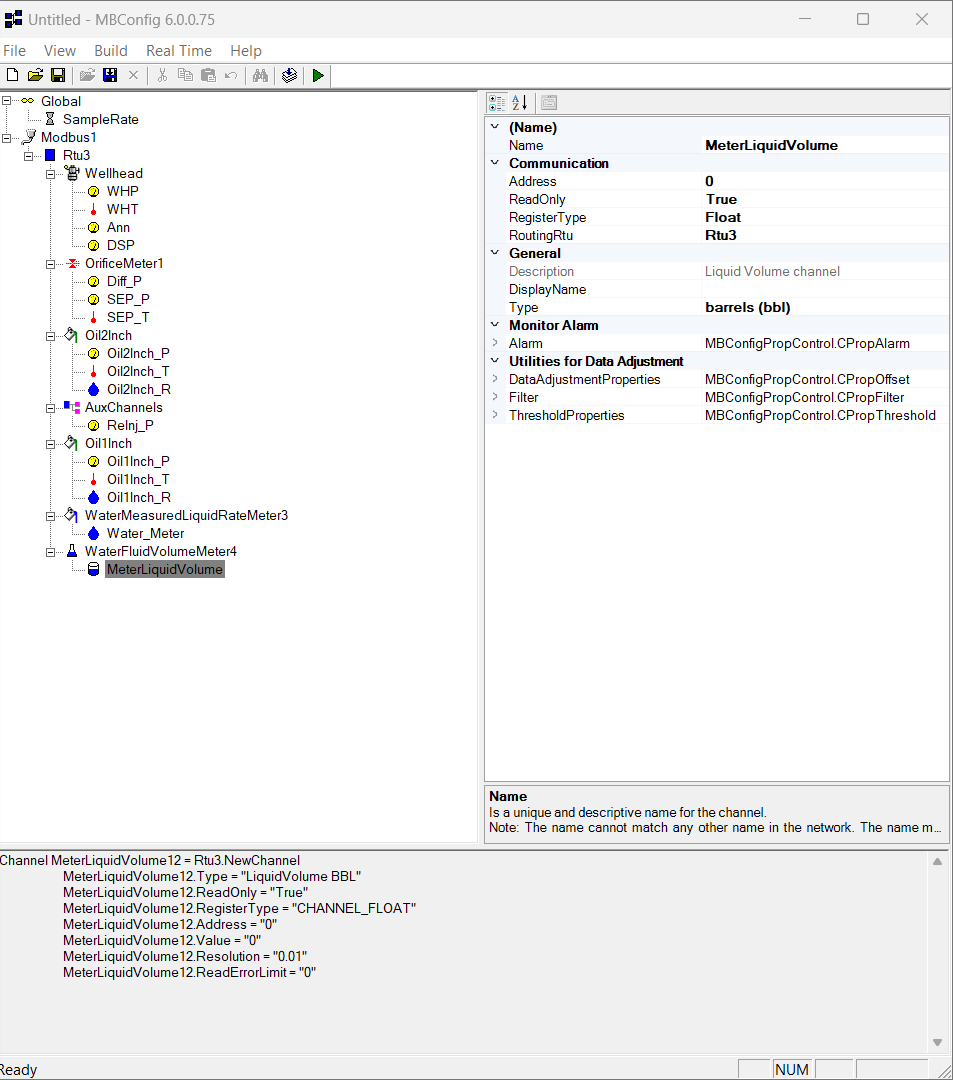
the final appearance for the modbus


3. fekete

  • when you play depug the fekete it load the file of the modbus.
  • when you make the chart you need to click plot tap and add / remove series

to do the report of flow test from the fekete on barge :-

  1. we add comments in the fekete
  2. we add all data required like (Co2, H2s, Shrinkage, API, )
  3. go to cleanup sheet and filter it from the filter icon and filter the time of the test
  4. after filtering the sheet go to file list and save the file as CSV and check on (filter on)
  5. we take the data from the file we saved and we put it in a report file
  6. we remove all rows we do not need
  7. in the chokemanifold side we choose 1 for positive and 2 for the adjustable side
  8. we copy the comments and paste it in Activity Log sheet
  9. in case if we do only flow back we do not add some data like :
    • Gase rate
    • total Gase rate
    • Oil rate @60F
    • GOR1
    • GOR2
    • total GOR
    • API


4. modbus in Island Sarb

  • open the data logger (ip: 192.168.1.10 )
    • username: "admin"
    • password: "default"
  • 1 bar = 14.5 psi
  • add the following:
    • WLP = wellhead pressure
    • WLT = wellhead Temperature
    • WLD = wellhead differential pressure
    • WLF = wellhead flow meter
  • For every add change the properties to :-
    • sample rate (time out) = minutes
    • value = 1
    • baud = 38400
    • ports = com7 ( we can know the the number of the port from device manager)
    • rtu2 = ID: 232
  • add well head:
    • Case pressure name = annulus
    • ID/ address = 4ddd5
    • Pressure = psi Guage
    • Temperature = celicius (C°)
  • Choke manifold:
    • Case pressure name = annulus
    • ID/ address = 4ddd5
    • Pressure = psi Guage
    • Temperature = celicius (C°)
  • Choke manifold:
    • WHP= well head pressure
    • WHT= well head temperature
    • DSP= Downstream pressure
    • Annulus
  • Separator names that will change
    • SEP.P= Separator Pressure (metric static)
    • SEP.T= Separator temperature(metric Temperature)
    • Diff.= Differential Pressure
  • 2inch oil
    • Volume of the liquid
  • 1inch oil
  • 1inch water
  • 2inchwater
  • Gas meter For 6inch
    • Orifice meter
      1. Meter position = downstream
      2. Run size = ...
      3. Bore ID = 5761
      4. Tube tap = flange
    • diff
      1. Address = 40045
      2. Type = inches of water
  • Oil meter =》 Volume meter / oil 2 inch
    • - oil fluid volume
    • meter static name = oil2 Sep.p
    • meter temperature name = oil2 sep.T
    • meter liquid volume
      1. name = oil2 volume
      2. Type = barrels
      3. Rate = bpd ( barrel per day ) If we need rate and volume from the flow, put the last digit for rate 7 and for volume 5
  • Aux channels ( for extra sensors )
    • Differential =》 inches of water
    • Revision: ( wh - gas6inch - orifice meter - gas3inch - oil2inch - oil1inch - aux - water - coriolis meter )


1. How to convert from Fahrenheit to Celsius and from Fahrenheit to rankine?

Temperature in Rankine= Temperature in Fahernheit+460
Temperature in Fahrenheit= 32+ (1.8*Temperature in Celsius)


1. Calculating Oil SG

SG-oil = 141.5 / (131.5+ API)


5. How to change between 3" & 6" gas line in fekete

...


1. Notes

  • 6" gas line meter size in fekete = 5.187"
  • 3" gas line meter size in fekete = 3.088"
  • Gas Oil Ratio = Gas Rate (sfc/d) standard cubing feet per day / Oil Rate (bbl/d)
  • GOR estimation = 0.1 X (depth per feet)


Chapter Test